
Geometry Game
| Genre | Arcade |
| Platform | Browser, mobile and desktop |
| Developer | RobTop (original Geometry Dash) |
| Released | 2016 |
| Players | Single player |
| Price | Free to play |
| Rating | 4.3/5 from 29,747 ratings |
| Updated | July 2026 |
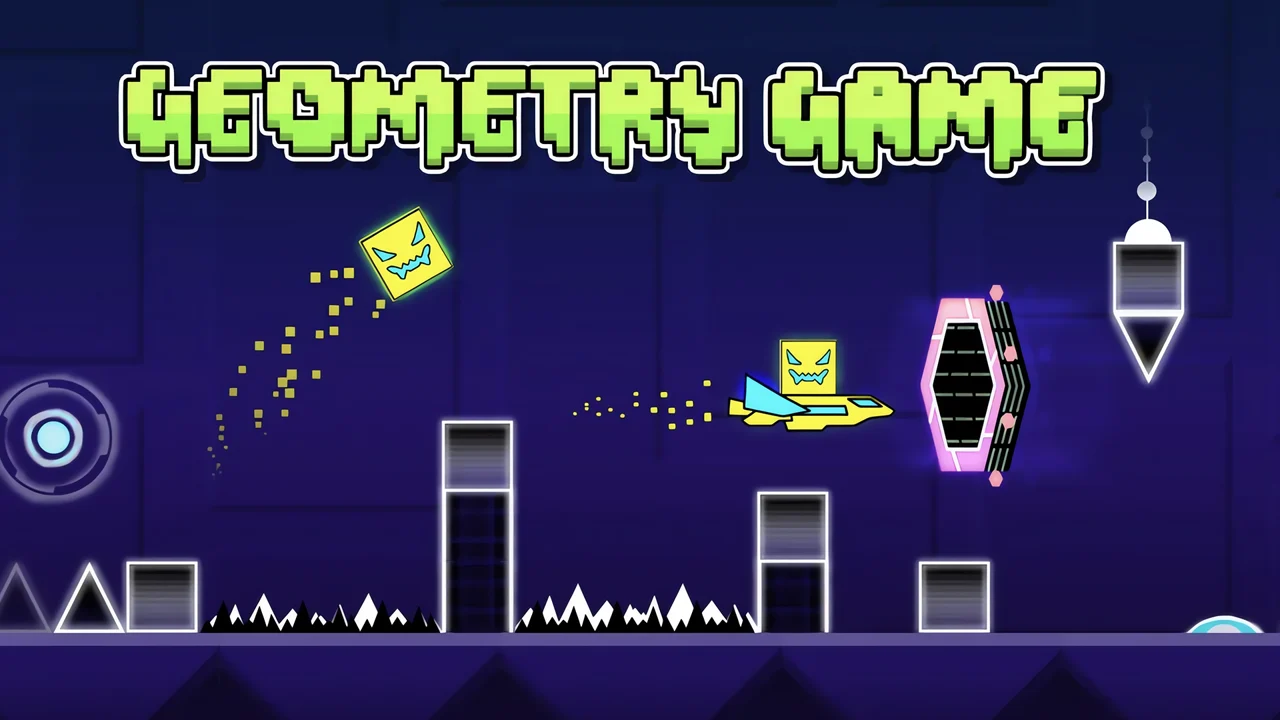
Geometry Game is a free rhythm platformer that runs straight in your browser on African Safari Games, with no download and no account needed. You pilot a small square through a gauntlet of spikes, walls and traps while an electronic soundtrack drives every jump. Tap once to leap, tap again at exactly the right beat, and try to reach the end of the level without a single crash.
The catch is brutal but simple. One mistake and the whole level resets from the start. That die and retry loop is what keeps people glued to the screen, because each run teaches you a little more of the pattern until the obstacles start to feel like the music itself.
- Genre: a one button rhythm platformer in the Arcade category.
- You steer a self moving square past spikes and traps, timing every jump to the beat.
- Single player, with a Practice Mode that lets you drop your own checkpoints.
- Standout feature: levels scroll automatically and obstacles are synced to the soundtrack.
What is Geometry Game?
Geometry Game is a side scrolling platformer built around timing rather than free movement. Your square travels forward on its own, and your only real job is to decide when it jumps, when it holds position, and when it steers. Every hazard is placed with the music in mind, so the soundtrack is less background decoration and more a cue sheet for what comes next.
It began life as a Scratch take on Geometry Dash, the 2016 hit from developer RobTop. This version keeps the core idea intact: tight, music driven obstacle courses where a single mistimed tap sends you back to the start. There is no health bar and no lives system to fall back on. You either clear a section or you restart it, and that binary pressure is the whole game.
How to play Geometry Game
- Hit play and watch the square start rolling forward on its own.
- Tap the screen, click the mouse, or press space to jump over the first spikes.
- Listen to the beat and time your taps so jumps land just before each hazard.
- When you hit a portal or pad, adapt to the new speed or gravity without panicking.
- Reach the end of the level without crashing to complete it.
- Drop into Practice Mode whenever a section keeps wrecking you, place a checkpoint, and repeat that chunk until it sticks.
Steering the cube and the vehicles
The controls are deliberately minimal, which is the point. Most of the game is a single button, but a few vehicle sections layer steering on top of jumping. Knowing which form you are in tells you what each tap will do.
| Action | Desktop | Mobile |
|---|---|---|
| Jump the cube | Left click, space, or up arrow | Tap anywhere on screen |
| Steer ship and UFO forms | Hold to rise, release to fall | Hold the screen to rise |
| Place a checkpoint | Click the marker button | Tap the checkpoint icon |
| Pause the run | Press Esc | Tap the pause icon |
The cube and its fixed jump
The default form is the cube, and its only move is a fixed height jump. You cannot adjust how high or how far it travels, so success comes down to choosing the exact frame to leave the ground. Jump too early and you land on a spike. Jump too late and you slide into a wall. Because the cube moves at constant speed, the only variable is your timing, and that is where the rhythm comes in.
The flying sections
Midway through most levels you pass through a portal and switch forms. The ship and similar vehicles fly rather than jump, and you steer them by holding the button to climb and releasing to drop. These passages trade precise single taps for steady hold and release control, and the music still tells you when to rise and fall. Treat them less like jumping puzzles and more like surfing the beat, and they get a lot easier.
Portals, pads and orbs
Where a normal platformer would hand out power ups, Geometry Game builds interactive objects straight into the track. They look small, but each one rewrites the rules for a stretch of the level, and reading them quickly is a skill of its own.
| Object | What it does |
|---|---|
| Gravity portal | Flips which way is down, so you run on the ceiling |
| Speed portal | Changes how fast the level scrolls |
| Vehicle portal | Switches you between the cube, ship and other forms |
| Jump pad | Launches you upward automatically on contact |
| Orb | Triggers a mid air action when you tap while touching it |
Gravity flips
A gravity portal inverts the screen. Suddenly the floor is overhead and the ceiling is under your feet, and your jumps now send you falling upward. These sections feel disorienting for the first few seconds, then click into place once you trust the rhythm to tell you when to flip back. The trick is to stop fighting the inversion and just react to where the next safe surface is.
Pads versus orbs
Pads and orbs both move you, but they ask different things of you. A pad fires you the moment you touch it, no input required, which makes it a set piece you simply have to survive. An orb only fires if you tap while you overlap it, so it rewards a deliberate second jump in mid air. Mixing the two lets a level chain together long sequences of boosts that would be impossible from the ground.
Reading the rhythm
The soundtrack is not decoration. Jumps, drops and portal changes land on the beat, which means a player who listens has a real advantage over one who only watches. A loud snare often lines up with a spike you need to clear. A bass drop frequently marks a gravity flip or a speed change. Once you notice the pattern, you can almost play with your eyes half closed, because the music is calling out the next move.
This is also why the sound should stay on. Players who mute it lose half the information the level is giving them, and their success rate drops fast. If a section feels random, the problem is usually that you are reading only the visuals and ignoring the beat.
Practice Mode and checkpoints
Practice Mode is the single most useful feature for new players. In a normal run, dying resets the entire level, which gets punishing on the longer stages. Practice Mode lets you drop green checkpoints anywhere, so when you crash you respawn at the last marker instead of the start.
The smart way to use it is to break a level into chunks. Drop a checkpoint at the start of a hard passage, grind that passage until it feels automatic, then move the marker forward to the next trouble spot. Once you can clear every chunk on its own, string them together in a real run. That is how a level that looked impossible starts to feel finishable.
Tips to survive the harder levels
- Practice Mode first, every time. Never throw yourself at a brutal section in a real run before you have checkpointed through it.
- Follow the beat out loud. Humming or tapping the rhythm helps your fingers lock onto the timing.
- Watch a few seconds ahead. By the time you react to a spike directly under you, it is already too late.
- Drill one object type at a time. If gravity portals keep killing you, find a level that leans on them and repeat it in Practice Mode.
- Take breaks after long sessions. Timing based games eat your focus, and tired hands mistime jumps.
- Accept the restarts. The die and retry loop is the game, not a flaw in it, and getting angry only makes your timing worse.
Why every crash feels fair
Most difficult games get away with frustration by blaming the player. Geometry Game does something sharper. It makes every death unambiguous. When you crash, you know exactly which tap was wrong, and you usually know the fix on the next attempt. There is no random element, no enemy that behaves differently each time, no cheap hit you could not have seen. The level is identical every run, which means the only thing standing between you and the finish is your own consistency.
That consistency is what makes the wins land. Clearing a section you failed fifty times feels earned in a way few browser games manage, and it is why players come back for one more attempt long after they said they were done. The difficulty is real, but it is honest difficulty, and the rhythm gives you a guide rail all the way through.
Is Geometry Game free and unblocked?
Yes on both counts. Geometry Game is free to play here on African Safari Games, loading straight in the browser with nothing to install. Because it runs as a web game, it works on Chromebooks, school laptops, Macs and most locked down machines that still allow browser titles. You do not need to sign up, hand over an email, or download an installer. If you would rather play on the move, the native mobile apps cover the same core gameplay.
Get Geometry Game on mobile
Geometry Game has native iOS and Android apps, so you can keep chasing that clean run on your phone instead of only in the browser.
Frequently asked questions
Is Geometry Game free?
Yes. Geometry Game is free to play in your browser with no download and no account.
How do I jump in Geometry Game?
Tap the screen on mobile, click the mouse, or press space or the up arrow on desktop. The cube jumps a fixed height, so timing matters more than how hard you press.
Is Geometry Game multiplayer?
No. It is a single player game, though Practice Mode and shared community levels keep it from feeling empty.
Who made Geometry Game?
The original Geometry Dash was created by developer RobTop in 2016. This version is a Scratch build based on that game.
Can I play Geometry Game unblocked at school?
Yes. Geometry Game is unblocked on African Safari Games and runs straight in your browser, with no download, so it works on most networks that allow browser games.
Does Geometry Game work on Chromebook?
Yes. Because it runs in the browser, Geometry Game plays fine on Chromebooks, Macs and most school or work computers without installing anything.
Geometry Game gameplay video