
Ramp Car VS Police: CHASE
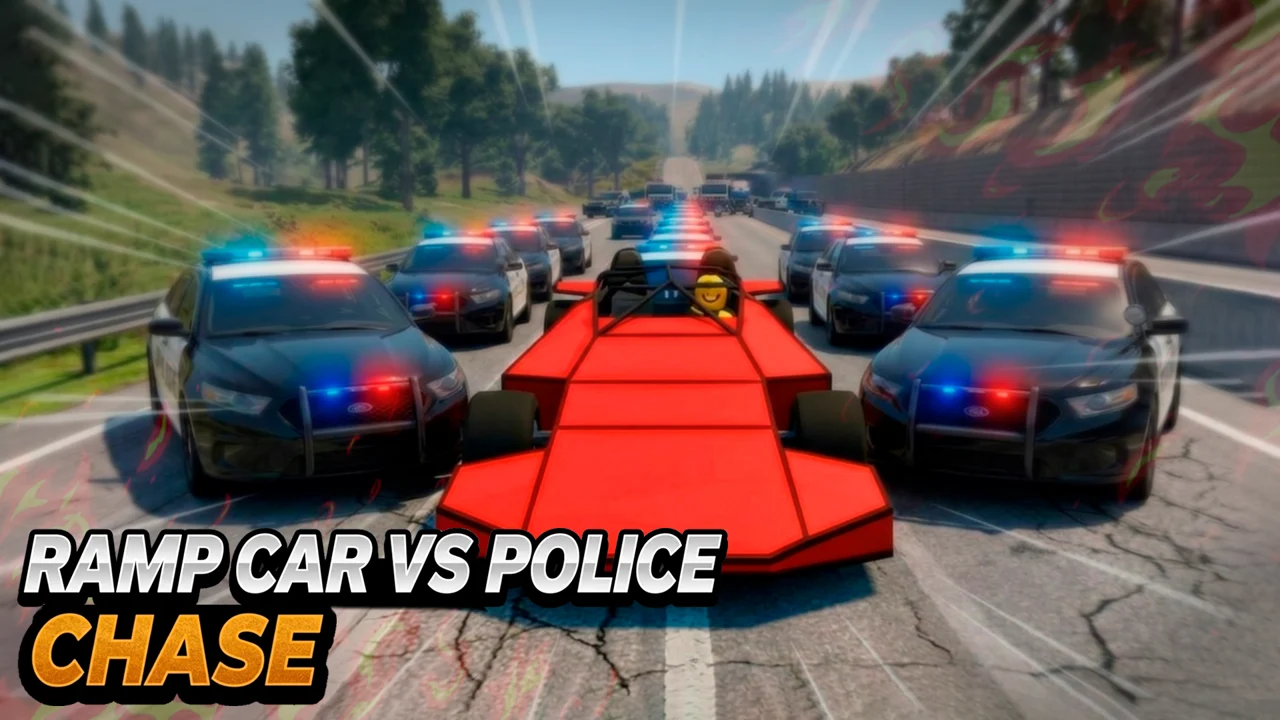
| Genre | Driving |
| Platform | Browser, mobile and desktop |
| Developer | Kingplay |
| Released | 2026 |
| Players | Single player |
| Price | Free to play |
| Rating | 4.7/5 from 96,192 ratings |
| Updated | July 2026 |
Ramp Car VS Police: CHASE is a 3D driving game from Kingplay that turns a police pursuit into a wrecking yard. You choose a ramp car, a wedge truck, or a turbo car, then rip down a packed highway while patrol cars try to run you off the road. The point is not to escape cleanly. It is to stay alive as long as possible while the asphalt behind you fills with flipping traffic and twisted metal.
It is free to play in your browser, no download required, and it leans into destruction more than realism. One run you are sending sedans cartwheeling off a ramp. The next you are driving a six-meter steel wedge straight through a wall of brake lights. The wanted level climbs every few seconds, so the real question each run is always the same: how long can you keep the chaos going before the cops close the trap?
- 3D driving and destroy game from Kingplay, released in 2026, carrying a 4.7 rating from close to a hundred thousand player reviews.
- Drive a ramp car, a wedge truck, or a turbo car through live traffic while a police wanted meter climbs.
- Two modes: Chase, where you survive and smash, and Free Ride, where you cruise with no cops on your tail.
- Keyboard controls with tilt steering in the air, several camera angles, and vehicle upgrades.
What is Ramp Car VS Police: CHASE?
Ramp Car VS Police: CHASE is a single-player driving game in the destroy and police-chase corner of the genre. The core loop is simple and brutal. You drive fast, you smash whatever is in front of you, and you stay alive while the police escalate their pursuit. Your wanted level starts at one and the heat builds from there, so the opening seconds feel almost calm and the later seconds feel like a warzone on wheels.
The game hands you three very different vehicles and lets the choice shape how you play. The ramp car flips traffic into the sky. The wedge truck shoves through it. The turbo car ignores most of it in favor of raw top speed. You pick the toy, and then you see how long the highway lets you keep playing with it.
The pace is what holds it all together. Early on you have room to build speed and choose a line. As the wanted level rises, that room shrinks, the police get bolder, and you start making faster and dirtier decisions. The game is less about precision driving than about reading a constantly collapsing road and choosing which wall of cars to drive through next.
How to play
- Pick your vehicle from the ramp car, the wedge truck, or the turbo car before the chase begins.
- Pick your mode: Chase for the pursuit, or Free Ride if you only want to drive.
- Hold the gas and steer with WASD, tilting the car midair to control your landings.
- Build your wanted level by ramming police cars and chaining traffic accidents together.
- Use the handbrake to break traction, and press turbo if your vehicle has it, to escape a closing trap.
- Survive as long as you can, because the run only ends when your car is wrecked.
Steering, turbo and camera controls
The keyboard layout is standard for a driving game, with a couple of keys doing extra work depending on which vehicle you drive. The turbo and jump keys only function on cars that actually have those parts fitted, so do not be surprised when nothing happens on a vehicle that lacks them.
| Action | Desktop | Mobile |
|---|---|---|
| Move and steer | WASD | On-screen joystick |
| Tilt in the air | WASD while airborne | Tilt the device |
| Handbrake | Space | Brake button |
| Pause | Tab | Pause button |
| Look behind | C | Look button |
| Change camera | V | Camera button |
| Turbo | X (if equipped) | Turbo button |
| Jump | E (if equipped) | Jump button |
Tilt control in the air
When your car leaves the ground, the WASD keys switch from steering to tilting the vehicle in the air. This matters most for the ramp car, where a clean launch can carry you right over a row of police cruisers. Hold forward to nose down for a faster landing, and pull back to hang in the air longer. A bad tilt means a roof-first landing, and a roof-first landing usually ends the run on the spot.
Camera views and first-person
Pressing V cycles through the camera options, and one of them drops you into a first-person cockpit view. The chase view behind the car is the easiest angle for reading traffic ahead. First-person is harder to drive, but it makes the wedge truck feel enormous and the turbo car feel genuinely fast. Tap V until you land on the angle that matches how hard you are pushing, and remember you can look behind with C when a cruiser is sitting on your tail.
Ramp car, wedge truck and turbo car
The three vehicles are not paint jobs. They are three different games bolted onto the same highway, and the right pick depends on whether you are in the mood for comedy, brute force, or adrenaline.
| Vehicle | What it does best |
|---|---|
| Ramp car | Launches traffic into the air on contact |
| Wedge truck | Plows a six-meter steel wedge through anything |
| Turbo car | Top speed that tests pure driving skill |
The ramp car
The ramp car is the joke vehicle, and the joke is that every sedan you touch becomes a projectile. Drive the ramp into a traffic jam and the cars in front of you launch skyward in a chain. It is funny on its own, and it is genuinely useful when a launch clears your path or drops a car onto a pursuing cruiser. A turbo engine upgrade stretches those launches further and turns a small pileup into a long, slow arc of flying vehicles.
The wedge truck
The wedge truck is the blunt instrument of the three. A six-meter steel wedge sits on the front, and it does not launch anything, it removes it. Traffic in front of you stops being an obstacle and starts being debris pushed to the sides. The truck is slower to turn than the ramp car, but in a head-on mess it is the most forgiving vehicle in the game, because almost nothing survives long enough to box you in.
The turbo car
The turbo car trades the gimmicks for speed. There is no ramp to launch cars and no wedge to shovel them aside, just a heavy right foot and a top end that punishes every mistake. It is the hardest vehicle to keep alive, because the faster you go the less time you have to read the road, but it is also the most rewarding when you thread a closing gauntlet of police cars at full throttle and come out the other side.
Chase and Free Ride modes
There are two ways to play, and they pull in opposite directions. Chase is the pressure cooker. Free Ride is the sandbox.
| Mode | How it works |
|---|---|
| Chase | Wanted level starts at one and rises; smash cops and trigger accidents to score |
| Free Ride | No police and no clock; just drive and explore the road |
Surviving the Chase wanted meter
In Chase, your wanted level begins at one and climbs as you cause damage. Higher levels mean more police cars, more aggressive tactics, and a thinner margin for error. Your score is essentially how long you last and how much you break along the way, so the strategy is to keep moving, keep crashing traffic into the pursuit, and never let the cops pin you against a wall or a guardrail. Every second past the early game is earned, and once the meter is high enough the road stops feeling like a road and starts feeling like a closing net.
Using Free Ride to learn the road
Free Ride drops the police entirely. There is no wanted meter and no clock, just you, your car, and the highway. It is the right place to learn how each vehicle handles at speed, how the tilt control feels after a big jump, and which camera view you can actually drive in without crashing. Treat it as a test track. Everything you figure out here, from braking points to landing angles, carries straight into a Chase run.
Upgrades that grow the chaos
Vehicles can be upgraded over time, and the ramp car is the clearest example of why that matters. Bolt a turbo engine onto it and its launches get bigger, sending traffic farther and clearing more of the road with every hit. Upgrades are the real difference between a run that ends in ten seconds and one that lasts a full minute, so it pays to pick a vehicle early and pour your progress into it rather than bouncing between all three. The other two vehicles open up along the same lines, each sharpening what that vehicle already does well, so a wedge truck that already plows through everything plows through more of it, and a turbo car that already flies goes even faster.
Tips to survive longer and rack up chaos
- Start with the ramp car. The flying-traffic effect is the most forgiving way to learn how the chase escalates.
- Keep moving at all costs. A parked car is a dead car once the wanted level climbs, so never let the cops pin you against a wall.
- Steer traffic into the pursuit. The cars you launch or shove backward become instant obstacles for the police behind you.
- Save the turbo for escapes, not for show. Press X when a cruiser is about to sideswipe you, not on an empty stretch of road.
- Use first-person sparingly. It looks great but it costs you the traffic overview you need to stay alive.
- Practice your landings in Free Ride. A roof-first landing ends the run, and tilt control is the only thing that prevents it.
What makes it fun
What makes Ramp Car VS Police: CHASE work is that it never asks you to be a careful driver. It rewards the opposite. The best moments come from the destruction you cause, not the racing lines you hold. Watching a single ramp hit send five cars into the air, or feeling a wedge truck erase a traffic jam in one shove, is the whole appeal, and the rising wanted level gives that destruction a ticking clock. It is short, loud, and easy to restart, which is exactly the loop a browser driving game should aim for. Crash, laugh, restart, and do it again.
Is it free and safe to play in the browser
Ramp Car VS Police: CHASE is free to play on African Safari Games, right in your browser, with no download and no account. It runs inside the browser sandbox, so there is nothing to install and no files left behind on your machine. It works on most laptops and desktops, including Chromebooks and Macs, as long as the browser is reasonably current. The keyboard controls mean a physical keyboard makes life easier, but the game is also tagged for mobile, so a phone or tablet with on-screen controls will run it too.
Play on mobile
Ramp Car VS Police: CHASE runs in your browser. If you want something similar to play on your phone, Traffic Rider is a good pick.
Frequently asked questions
Is Ramp Car VS Police: CHASE free?
Yes. It is free to play in your browser with no download, no sign-up, and no cost.
Who made Ramp Car VS Police: CHASE and when did it come out?
It was made by the studio Kingplay and released in 2026.
How do you play Ramp Car VS Police: CHASE?
Pick a vehicle, choose Chase or Free Ride, then steer with WASD and survive the pursuit by smashing police cars and triggering traffic accidents. Space is the handbrake and V changes the camera.
Is Ramp Car VS Police: CHASE multiplayer or single-player?
It is single-player. You drive against AI police and AI traffic, not against other people.
Can I play Ramp Car VS Police: CHASE unblocked at school?
Yes. You can play it unblocked right here on African Safari Games, straight in your browser with nothing to install, so it runs on most networks that allow browser games.
Which vehicle is best to start with?
The ramp car is the friendliest starting pick, because launching traffic clears the road for you while you learn how the wanted level climbs.